

Mikorist
-
Broj sadržaja
46952 -
Na DiyAudio.rs od
-
Broj dana (pobeda)
654
Content Type
Profiles
Forum
Blog
Kalendar
Sve objavljeno od Mikorist
-
VPN može ekstra da se naruči - košta $71.76 na dve godine. Sa tim može da se gleda Netflix, Hulu, HBO Max, Amazon Prime Video, Disney+. Cepa brzina preko VPN skoro kao i bez njega...Preko mog rutera može direkt VPN tunel da se otvori sa njima. A može i posebno na svaki uređaj i/ili browser.... CTO njihov https://www.crunchbase.com/person/andrey-meshkov Firma radi na Kipru po njihovim zakonima
-
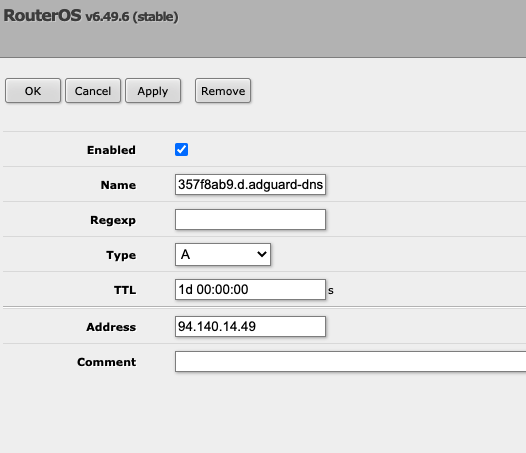
https://adguard-dns.io/en/dashboard/auth Moraš da se registruješ i uloguješ da bi ovo video Encrypted DNS server addresses AdGuard DNS supports all modern encryption protocols. Encrypted DNS addresses contain your device identifier ("ecce1521") to enable AdGuard DNS recognize and filter your DNS requests. DNS-over-HTTPS https://d.adguard-dns.com/dns-query DNS-over-TLS tls://d.adguard-dns.com DNS-over-QUIC quic://d.adguard-dns.com Plain DNS server addresses Some older devices may only use unencrypted DNS. Only use the Plain DNS protocol if you have no other option. Plain DNS requires that you link your device's IP address so that AdGuard DNS can recognize its DNS requests. You have to relink your device every time its IP address changes. 94.140.14.49 94.140.14.59 ovde imaju podešavanja za razne rutere Open the preferences for your router. Usually you can access them from your browser. Depending on the model of your router, try entering one the following addresses: Linksys and Asus routers typically use http://192.168.1.1 Netgear routers typically use http://192.168.0.1 or http://192.168.1.1 D-Link routers typically use http://192.168.0.1 Ubiquiti routers typically use http://unifi.ubnt.com Enter the router login and password (Often the default values are admin / admin). Note that if you don't remember the password from your router, you can often reset it by pressing the button on the router itself. Some models have a specific application to manage them, in that case the application should be already installed on your computer. Find where DNS settings are located in the router's admin console. Choose one of the following AdGuard DNS servers and replace the current addresses with the addresses of the chosen server: Default servers If you want to block ads and trackers. IPv4: 94.140.14.14 94.140.15.15 IPv6: 2a10:50c0::ad1:ff 2a10:50c0::ad2:ff Non-filtering servers If you don't want AdGuard DNS to block ads and trackers, or any other DNS requests. IPv4: 94.140.14.140 94.140.14.141 IPv6: 2a10:50c0::1:ff 2a10:50c0::2:ff Family protection servers If you want to block adult content, enable safe search and safe mode options wherever possible, and also block ads and trackers. IPv4: 94.140.14.15 94.140.15.16 IPv6: 2a10:50c0::bad1:ff 2a10:50c0::bad2:ff
-
Zato nosim svoje slušalice sa sobom pa ih utačinjem kod drugih . Zvučnici i akustika prostora mi više nisu merodavni. Zanima me isključivo izvor signala i predpojačanje......... p.s. Još nigde se nisam utakao bolje da svira
-
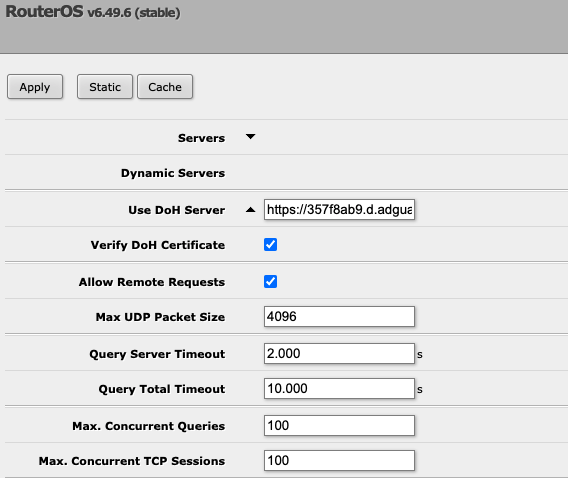
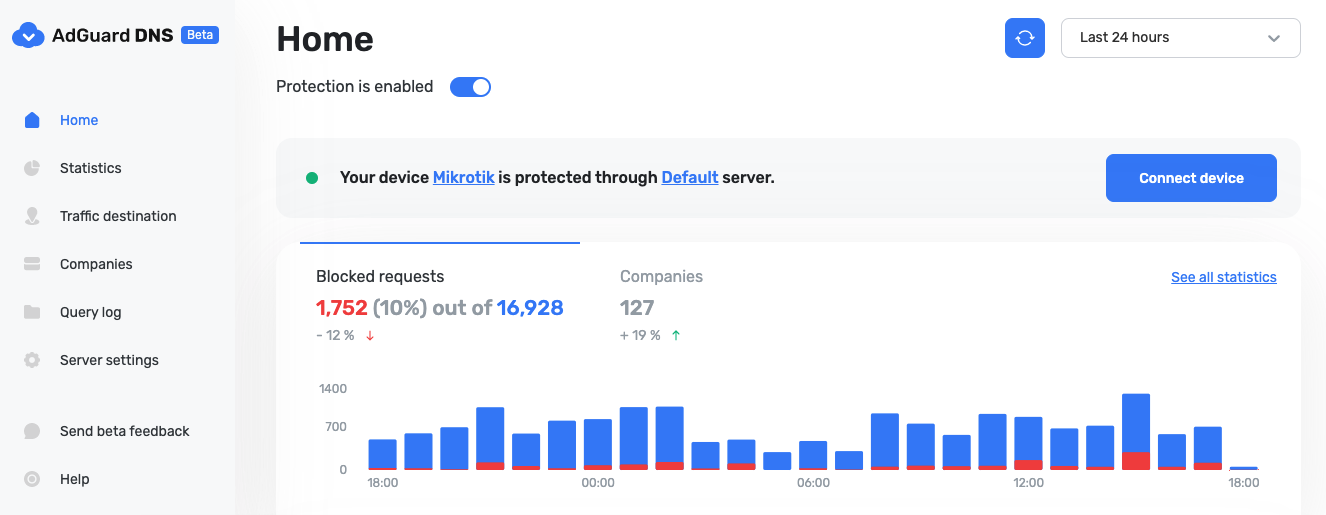
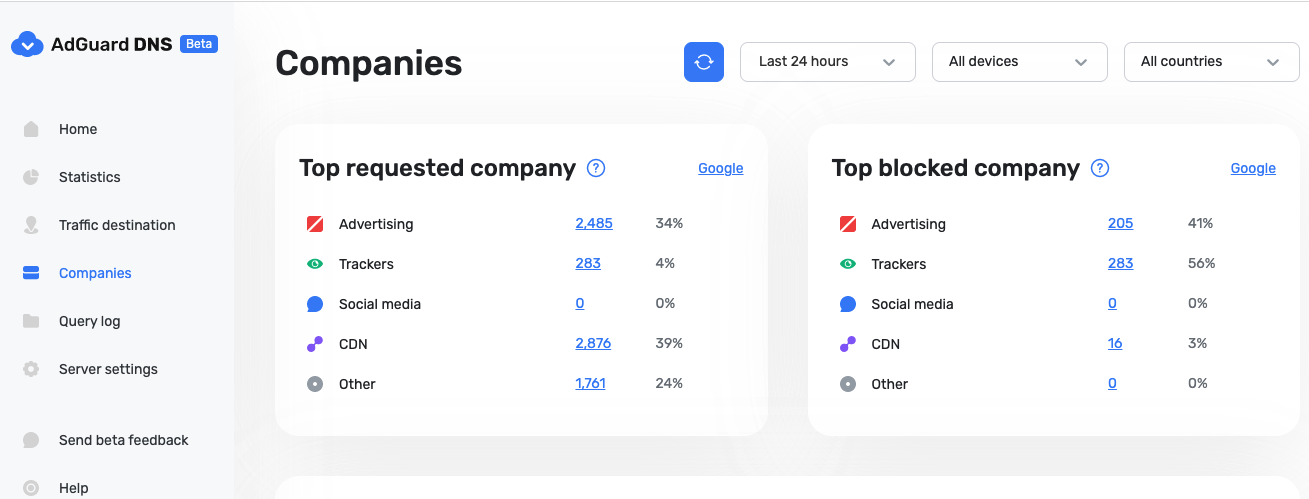
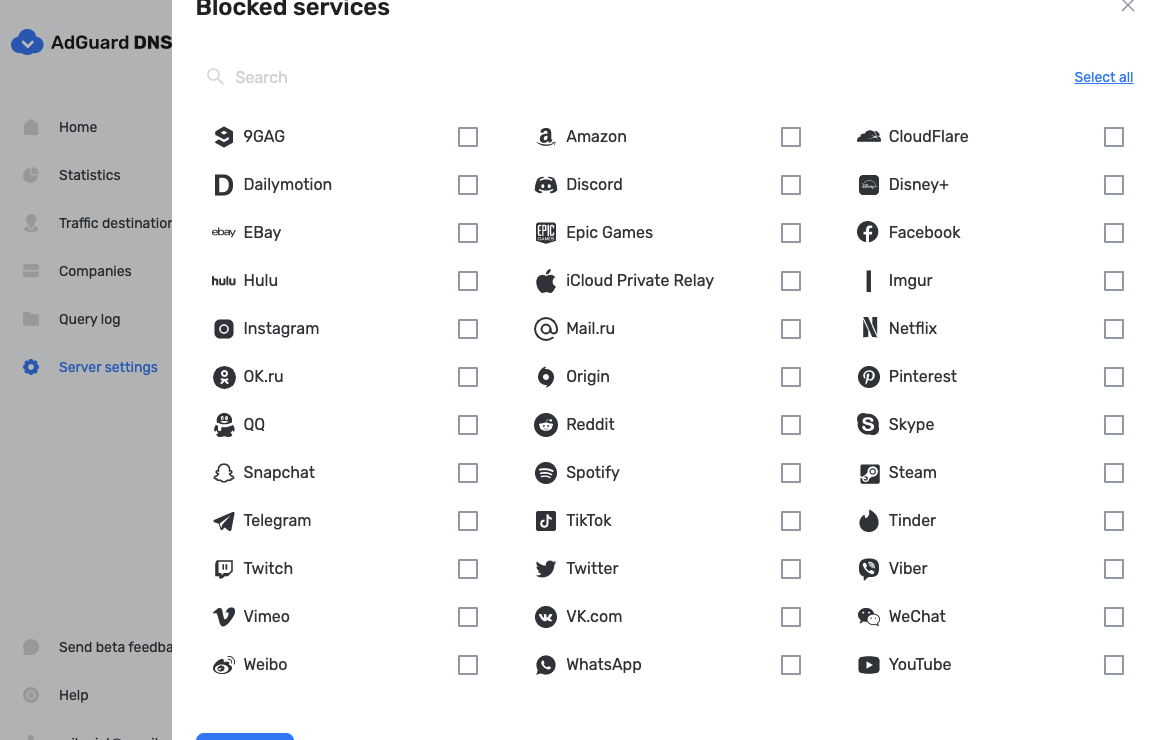
1. Teški... prešao na MTS optiku zbog istog problema. (Nema N1 na MTS - zabole me mnogo zbog toga) 2. Da ... (i mnogo više od toga) ako je dovoljno dobar ruter (zver od rutera) - postavljen u bridž mode koji ne daju na SBB 3. RB4011iGS+5HacQ2HnD-IN Evo ti celo uputsvo i problematika oko toga https://www.diyaudio.rs/topic/9837-problem-sa-sbb-ruterom/page/6/#comment-403302 Na sve ovo sam dodao pre neki dan /img/og-welcome.png?version=335 AdGuard DNS — ad-blocking DNS server ADGUARD-DNS.IO Create your DNS server that will protect your personal data, block ads and tracking and allow you to control access to specific content on the Internet. Nemam više nikakve reklame - ni na jednom MacOS/iOS uređaju - bilo da je vajrles ili ne....for free... Zvekneš DoH DNS Server i ćao-zdravo reklame - maliciozni sajtovi i trakeri + Statički isti Da ne pričam da može bilo koji ovaj servis na klik da se isključi

-
evo jedna stvar https://mega.nz/file/FB1gxbSD#UO8WJK8plxQSTcZFOEqlmhM1v6lO9ihytvcc7M232Pc ma bruka
-
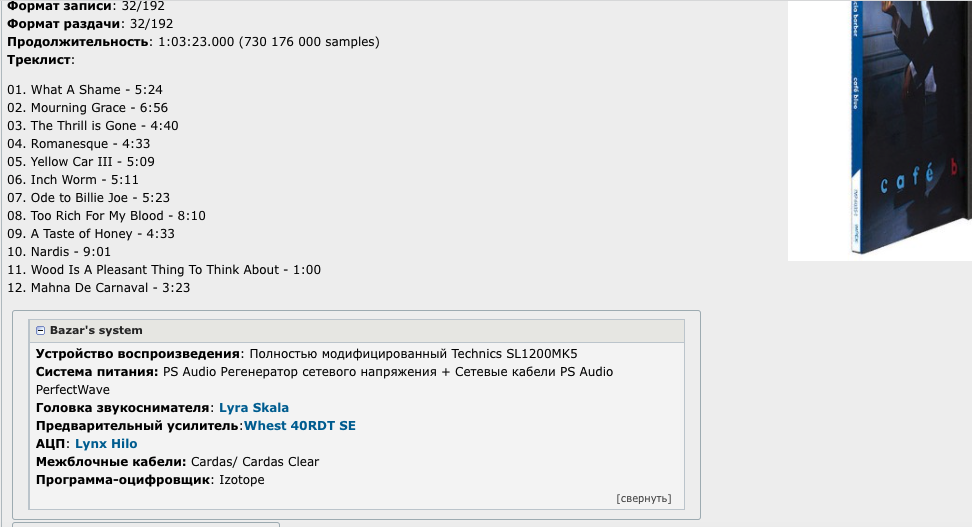
Lyra - Skala Phono Cartridge | Shop Music Direct WWW.MUSICDIRECT.COM Da se tešiš upravo slušam - kida ova Lyra za sve pare auu jbt čuje se ptičiji prdež u visokima na ovom snimku
-
Javi kako svira sad DAC...
-

PSYTrance , HoUsE, TEChNO, eLeCtRo, AmBienT :)
Mikorist je odgovorio/la BANAT's temus u Muzika , Film i Fotografija
Ovo Dragonfly ponovo počeo izbacuje singlove -
PSYTrance , HoUsE, TEChNO, eLeCtRo, AmBienT :)
Mikorist je odgovorio/la BANAT's temus u Muzika , Film i Fotografija
-
PSYTrance , HoUsE, TEChNO, eLeCtRo, AmBienT :)
Mikorist je odgovorio/la BANAT's temus u Muzika , Film i Fotografija
@BANAT ASTRO MUSIC · Astrix - Rising Dust - Universo -
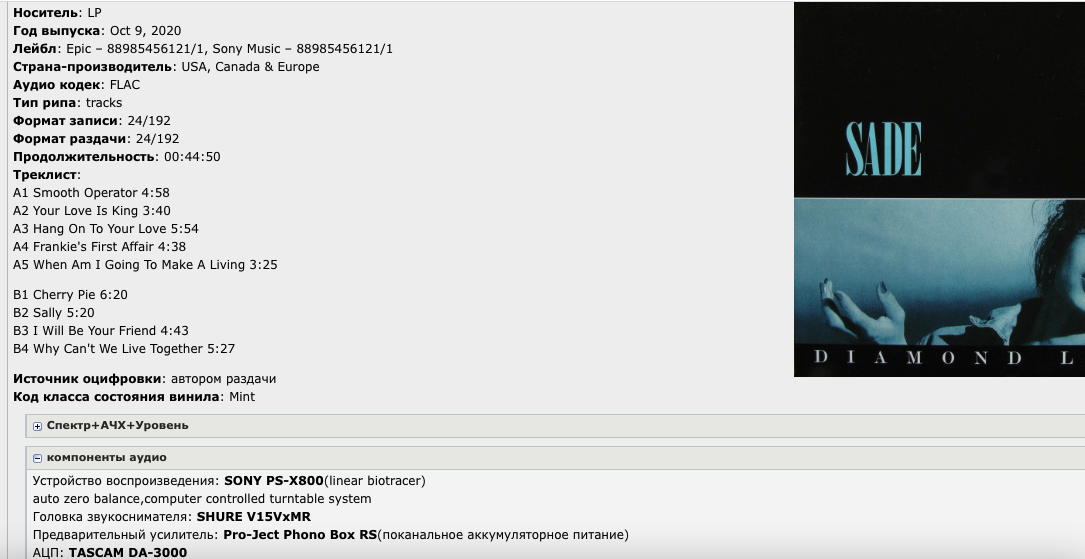
Nađi ovo na rutrackeru pa uporedi Semplovano na TASCAM DA-3000 na 24/192 Nema tu mnogo razlike ako se zanemari krckanje ploče
-
Pa jeste .... mi smo poludeli a ti si postao normalan. Sad ćeš i ti ponovo
-
Možda jesu izraženiji visoki - ali separacija je za medalju ovde
-
Zavisi od ukusa . Ostatka sistema koliko boji..... meni zvuči najbolje AT 440 MLa/b i u ovoj kategoriji jopet AT pobedio čak i slušalice imam AT - sav sam nabaždaren na njih
-
ova igla najbolje svira
-
-
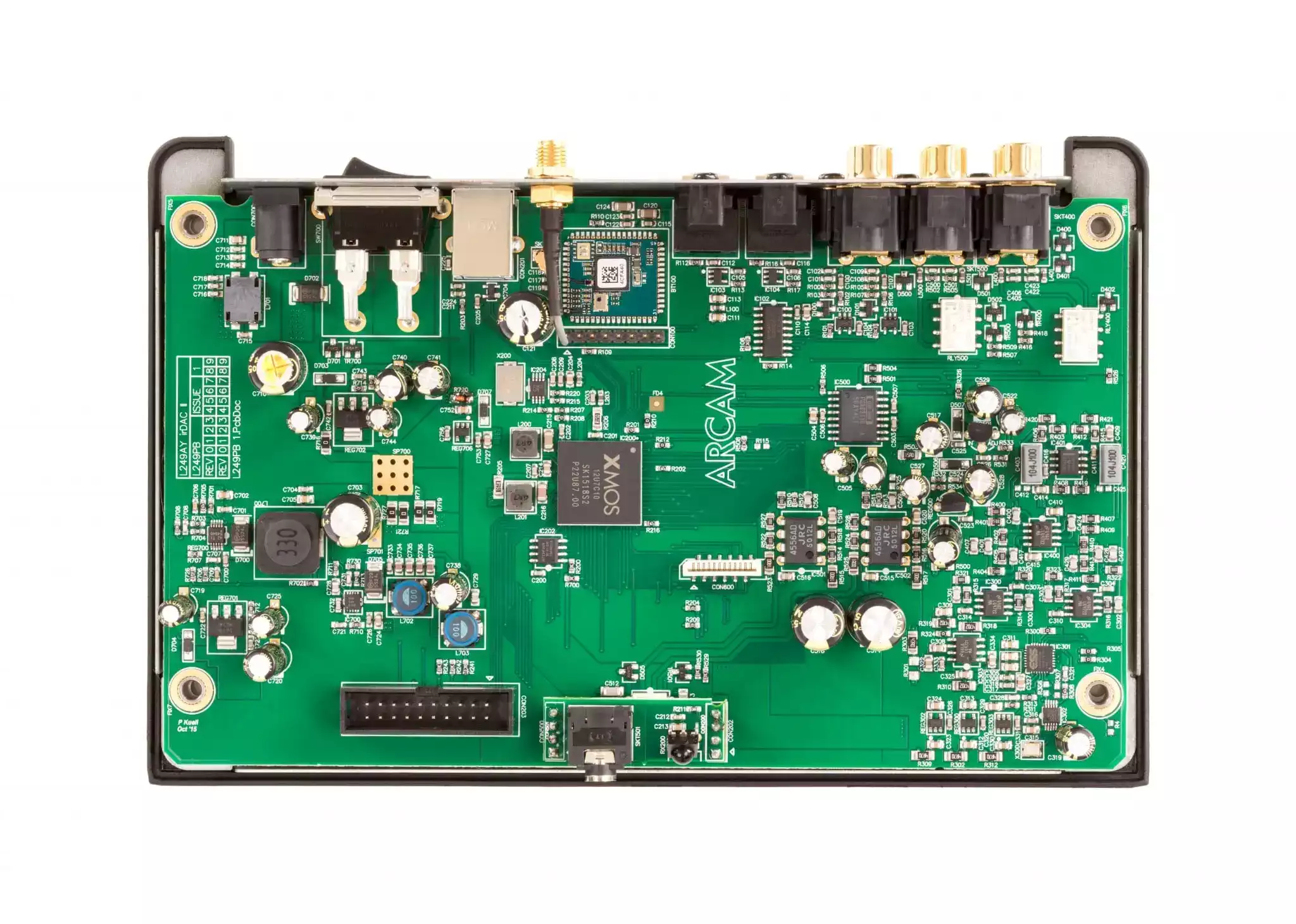
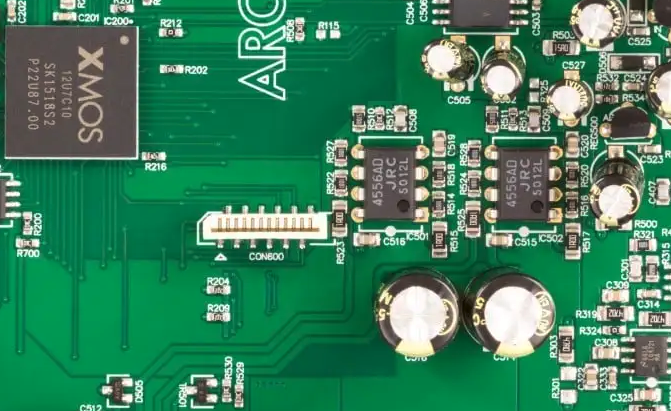
Prvo da vidimo konkretno šta je unutra od opampova....Šta se nalazi tačno u I/V conversion. Da li imaju podnožja ili su smd zalemljeni. Ako su su smd zameniti ih sve sa OPA1612 ili OPA1656 a u izlazu staviti SS3602 Dual Najbolja kombinacija su dva OPA1656 i SS3602 u izlazu. To jako slično svira gramofonu.
-
Zanimljivi & smešni na You Tube
Mikorist je odgovorio/la Leonardo's temus u Muzika , Film i Fotografija
-
Odlično. Slikaj ploču iznutra da vidimo štra ima
-
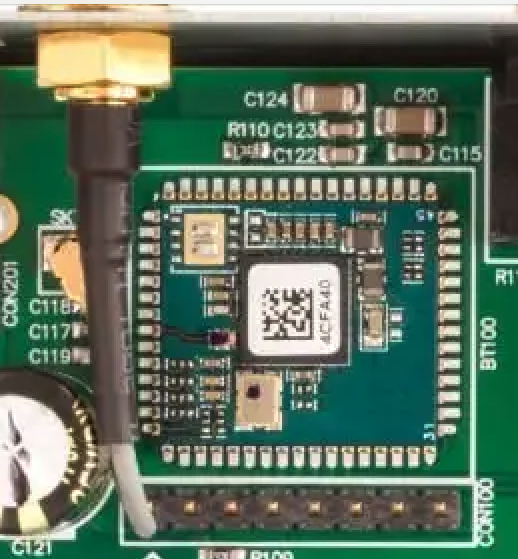
Ovo ne valja - ako je ovako napravljeno da piči antenski kabl iz ploče a da nije okovan mumetalom ovaj deo gde su gde su primopredajnički tranzistori na 2.480 GHz u tako malom kućištu ?
-
Napajanje zameni sa linearnim https://www.audiophonics.fr/34844-big_default/linear-power-supply-board-mje15034g-low-noise-48v-a-24v-2a.jpg Audiophonics - Linear Power Supply board MJE15034G Low noise 4.8V à 24V 2A WWW.AUDIOPHONICS.FR Here is a very high quality regulated power supply with a very low "ripple", high precision semi discrete with a double layer circuit. Namestiš lepo na 6V i zaboraviš zauvek Što se tiče iznutrica - ne znam da li je ova slika njegova Releji mogu da se zamene - mora da slikaš da vidimo koji su opampovi. Ima tu još mesta za apgrejdove - treba videti šta ova dva rade
-
-
Ja bi ICEpower 100AS2 - ICEpower ICEPOWERAUDIO.COM Containing a capable fly back power supply with a continuous power capability of 100 W and a short-term power of 300 W, combined with a 2x 100 W class D amplifier. The 100AS2 is perfect for applications such as stereo hifi and home automation amplifiers, active speakers, studio monitors as well as 2 channel guitar […]Read here
-
-
Zanimljive, smešne i čudne fotografije
Mikorist je odgovorio/la Mikorist's temus u Muzika , Film i Fotografija





-
Trenutno na sajtu 7 članova, 0 Skrivenih, 181 Gosta (Pogledaj celu listu)
-
Forumska statistika
9.2k
Ukupan broj tema452.1k
Ukupan broj objava -
Statistika članovȃ
3017
Svi članovi5071
Najviše na sajtu